
FluentSprout for schools
Speaking practice for your students between classes
For language schools and coaching centres: AI speaking practice, exam mocks and level checks, with a class code and progress for teachers.
Why schools use it
Speaking practice between classes
Exam prep in the real format
Every student at the right level
Set up a class in three steps
Step 1
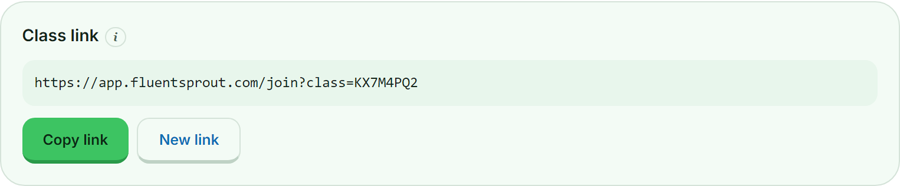
Share your class code
Create a class link in the app and share it in your group chat or on the board.
Step 2
Students join in a minute
They open the link, sign in and tap Join. Nothing to install on a laptop; the Android app works too.

Step 3
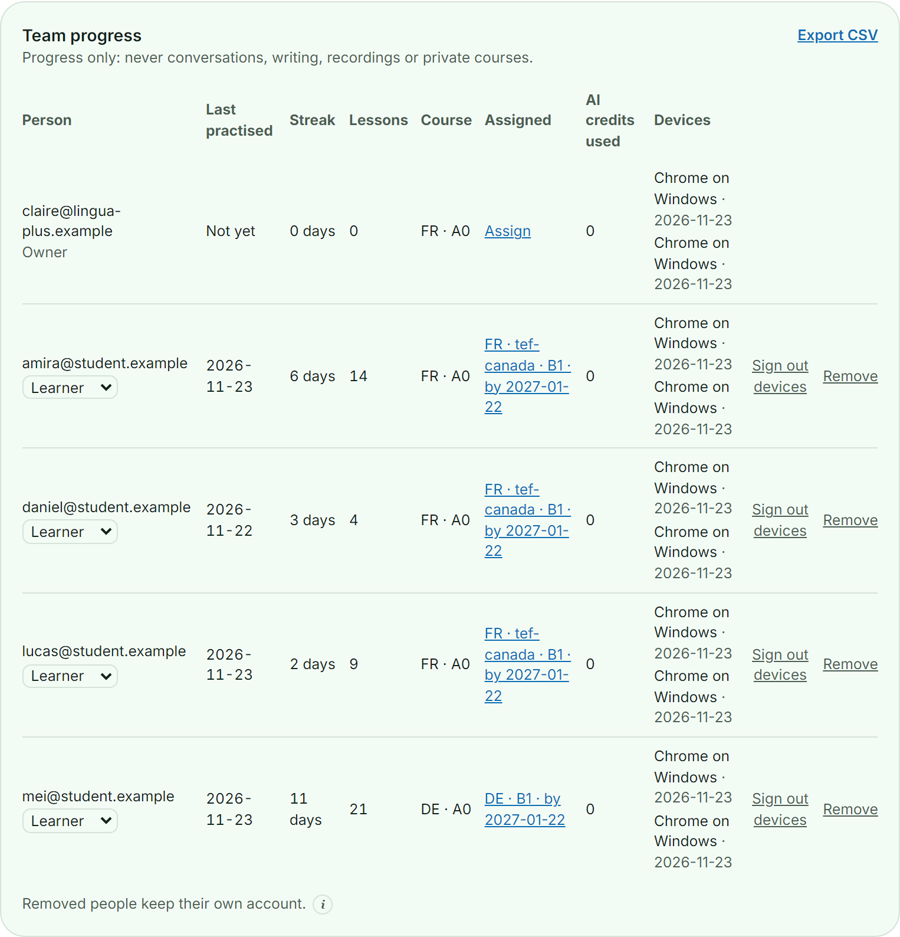
See who's practising
Each student's activity, streak, lessons passed and course, on one page or as a CSV.
Built for teachers
Class code
One link for the whole class. Replace it any time and the old one stops working.
Assignments
Set a course, exam, target level and due date for each student.
Progress report (CSV)
One row per student: activity, streak, lessons, course. Open it in any spreadsheet.
Placement check
Students start at the right level; you see their starting level.
Mock tests
Practice exams that follow the real test's format, with estimated scores.
AI speaking practice
Conversations, pronunciation feedback and speaking tasks, any time of day.
Bulk invites
Paste a list of emails to invite a whole group at once.
Remove and sign out
Take a student off the class in one click; their own account stays theirs.
Not yet: a built-in gradebook or direct links to school systems. The CSV report covers it for now.
Free pilot for your class
14 days, up to 10 students, all teacher tools. No card. After the pilot, schools pay per seat, minimum 5 seats. See pricing
A longer pilot or a bigger class? Book a demo and we'll set up a guided pilot with you.
Book a demo
Tell us about your school and we'll reply by email. Or email support@fluentsprout.com.
Questions
How does the free pilot work?
A teacher starts it in the app: 14 days, up to 10 students, no card, once per school. Need longer or a bigger class? Book a demo and ask for a guided pilot.
Which languages and exams?
French, German, English, Spanish and many more, at different depths. Exam practice is deepest for TEF and TCF Canada. The languages and exams pages show what's ready.
Can I see my students' work?
You see progress and activity, never their conversations, writing or recordings. That keeps practice low-pressure.
Does it replace the teacher?
No. It's practice between your classes: more speaking time and more repetition, with you setting the direction.
Does it connect to our school systems?
Not directly yet. Download the progress report as CSV and import it or keep it in a spreadsheet.
Do you guarantee exam results?
No. Practice scores are estimates. Only exam bodies issue official results.